We Drive Controls Guide
Split steering, gas, and brakes across your 2–5 player crew.
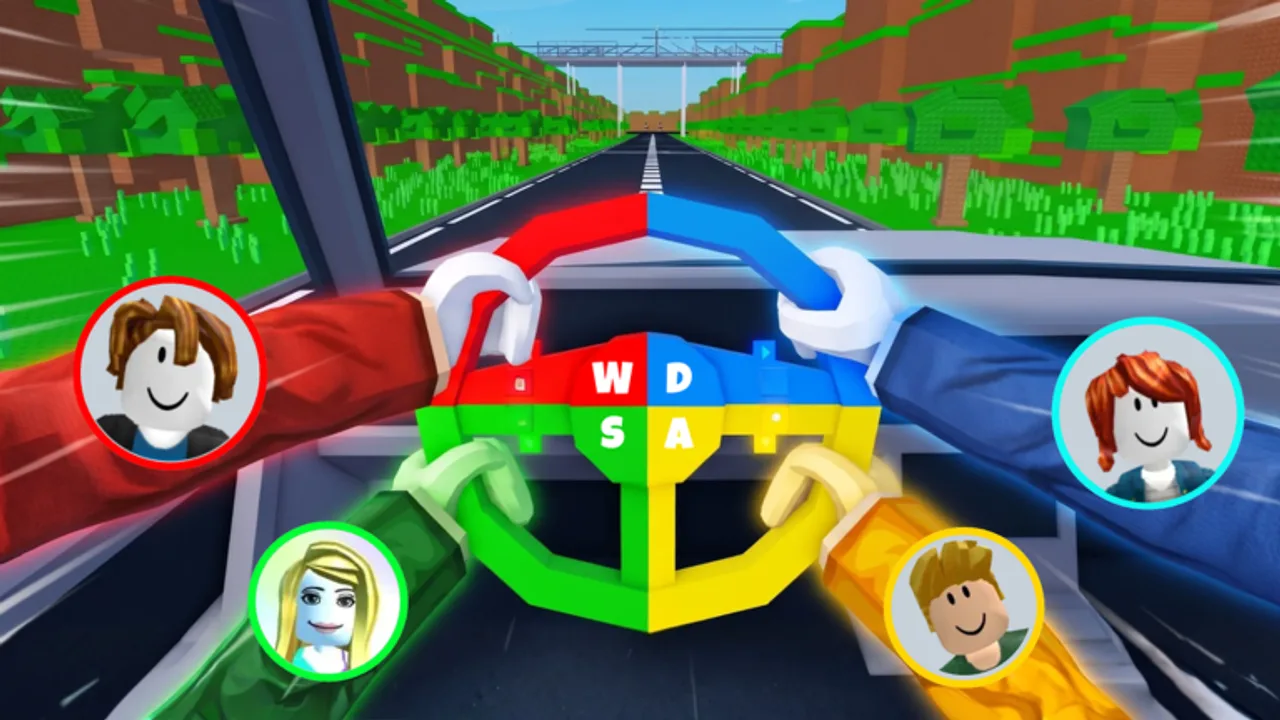
In We Drive [2-5 Player Obby], nobody drives alone. Cubird Studios splits the car across 2–5 players: one axis for steering, one for gas, one for brakes, with extra seats filling support or item roles depending on crew size. This page explains how to think about those roles on PC and mobile so the vehicle stops feeling random. Pair it with Getting Started if you have not run a session yet, and with How to Co-op when you need crew systems beyond raw inputs.
The three control axes
Treat the car as one machine with three human inputs:
- Steering — Aims the car. Early or late turns decide whether you kiss a wall or clear a gate. Steering without gas does nothing useful; steering without brakes cannot save a bad line.
- Gas — Adds speed. Soft taps matter more than mashing. Full throttle into a spinner or jump is the most common public-lobby fail.
- Brake — Removes speed and stabilizes landings or approaches. Braking too early stalls climbs; braking too late turns checkpoints into wipeouts.
With only two players, someone usually doubles a duty or you leave one axis lighter—agree which compromise you accept before you roll. With three, map one player per axis. With four or five, extras can call hazards, manage troll items, or swap in when someone disconnects. See Tips and Tricks for item etiquette once basic driving is stable.
Role assignment rules that prevent chaos
- Announce roles in chat before seating: “Steer: Alex / Gas: Sam / Brake: Jordan.”
- Do not swap mid-segment unless the car is stopped at a safe pad or checkpoint.
- If a player leaves, pause at the next checkpoint and re-assign—do not keep rolling with a dead axis. Recovery detail lives in Checkpoints and Worlds.
- Rotate roles between worlds so everyone learns the feel of each seat.
- One designated caller watches ahead and speaks early; callers should not also mash gas unless the crew is tiny.
PC tips
On PC, precision is higher but over-input is common. Keyboard drivers often hold gas longer than intended because the key feels binary. Practice pulse gas: short presses that add speed without locking you into a suicide line. Steering players should make small corrections instead of slamming left-right; the car carries momentum from the gas seat’s choices.
Brake players on PC should treat the key as a timed tool, not a panic button. Call “brake” half a second early so the finger is already moving when the hazard appears. If your crew uses mouse look while driving, agree whether the steer seat is allowed to free-look or must keep the camera track-forward—camera fights cause missed turns.
Use Roblox’s default movement binds only when you are out of the car. Inside the car, ignore the urge to “walk” the vehicle; your seat action is the only input that counts. After wipeouts, remount in the same seats unless you explicitly rotate—seat confusion is a silent killer on PC lobbies where people click the first free chair.
Mobile tips
Mobile crews succeed with larger touch targets and simpler calls. Gas and brake seats should use deliberate taps, not continuous thumb grind, unless a long straight explicitly needs sustained throttle. Steering on touch is noisier; compensate with earlier brake calls and softer gas so the steer seat has time to correct.
Chat is harder on mobile. Prefer voice when available. If you are text-only, the caller should be someone not on steer, because typing while aiming loses runs. Landscape orientation usually helps for the steer seat; gas and brake seats can stay portrait if that is more comfortable, as long as they can still see the track enough to time inputs.
When a mobile player’s touch lags, switch them to brake or caller instead of gas. Late gas is recoverable; late steering into a void often is not. Keep device performance in mind: low FPS on one seat makes the whole car feel cursed. Ask that player to close background apps before a serious clear.
Timing between seats
Great crews think in sequences, not simultaneous spam:
- Caller spots hazard.
- Brake softens approach if needed.
- Steer commits to the line.
- Gas reapplies only after the line is safe.
New crews reverse that order—gas first, steer mid-panic, brake after the crash. Practice the correct sequence on an easy stretch until it becomes muscle memory. How to Co-op expands this into full communication scripts.
Common control mistakes
- Ghost gas: Someone thinks they are braking but still holding throttle from a previous segment.
- Steer fighting: Two people believe they are on steer after a messy remount.
- Silent brake: Brake seat waits for a perfect call that never comes; set a default “brake on red hazard” rule.
- Role pride: Refusing to rotate means one player never learns why the gas seat hates sudden ninety-degree steers.
- Item distraction: Using troll items while you are the active gas seat. Hand items to a fifth player or stop first.
Practice drills (five minutes)
Run these before a long session:
- Stop drill — From rolling speed, brake-only stop before a marker. Repeat until distance is consistent.
- Soft launch — Gas pulses to crawl speed, then steer through a simple gate without brake.
- Full sequence — Caller names a fake hazard; crew runs brake → steer → gas in order.
- Swap drill — At a checkpoint, rotate one seat and repeat stop drill so the new brake player calibrates.
These drills sound basic. They separate crews that clear worlds from lobbies that argue after every fall. When you are ready for trap-specific reads, move to Tips and Tricks. For world progress rules after a wipeout, use Checkpoints and Worlds.
Linking controls to the rest of the wiki
Controls do not exist in a vacuum. Patch notes on Updates may change vehicle feel. Players covers badges like Welcome and studio credits for Cubird Studios, @terola0, @yusufmsp, and @Junhantur. Codes remains the place for promo redemption when codes exist—none verified as of November 2026 research. Scripts and Tier List are optional later reading; master shared inputs before optimizing anything else. Return to the Guides Hub or Wiki when you need the full index.
Master the three axes, keep seats honest, and We Drive stops being a chaos simulator and starts being a co-op rhythm game on wheels.
Frequently Asked Questions
Quick answers for We Drive crews on Roblox.
What are the main control roles in We Drive?
Steering, gas, and brakes are split across the 2–5 player crew. Extra players can call hazards, handle items, or cover disconnects.
Should I hold gas the whole time on PC?
No. Use pulse gas—short presses—so the steer and brake seats can correct. Constant full throttle causes most early wipeouts.
What is the biggest mobile control tip?
Keep the caller off the steer seat if you rely on text chat, prefer voice when possible, and move laggy devices off gas onto brake or calling.
When should we swap roles?
Between worlds or while stopped at a safe checkpoint—never mid-segment unless the car is fully stopped and the crew agrees.
Where do I learn crew communication next?
Read How to Co-op for role scripts and lobby habits, then Tips and Tricks for trap timing that builds on clean controls.