Getting Started in We Drive
Your first hour in Cubird Studios' shared-car Roblox obby.
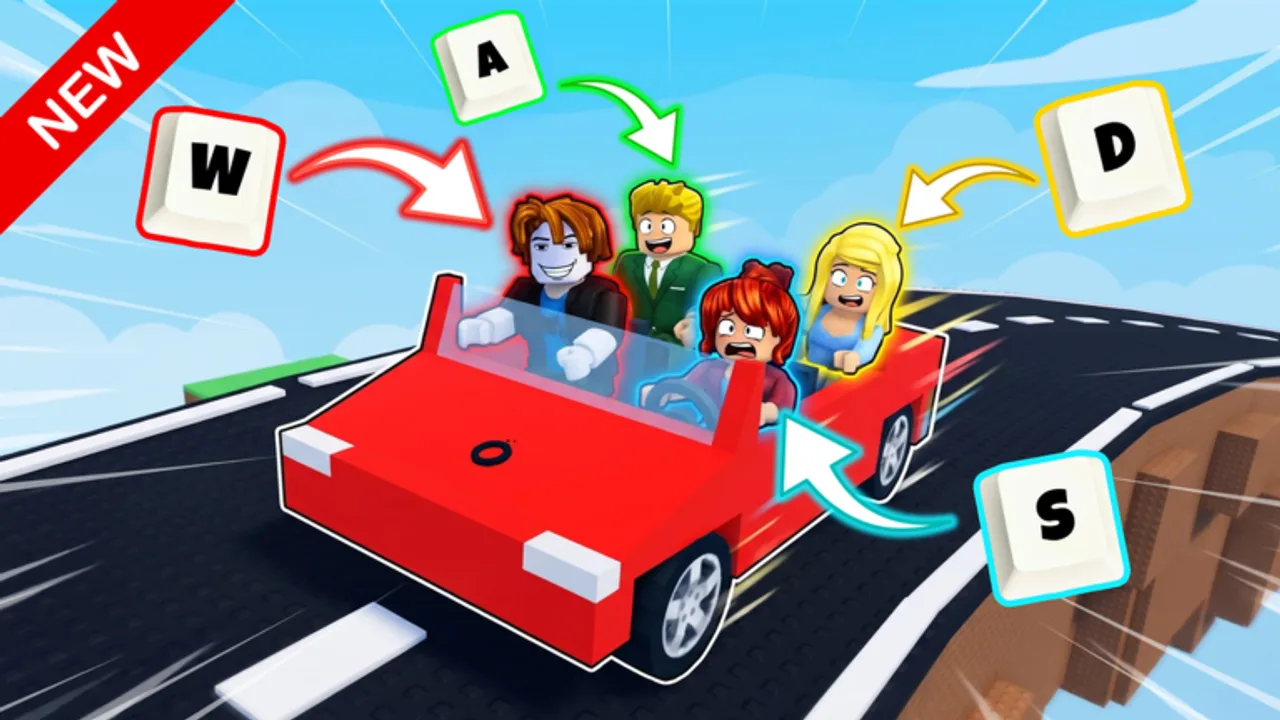
We Drive [2-5 Player Obby] is a Roblox experience by Cubird Studios where two to five players must share one car. Steering, gas, and brakes are split across the crew while you dodge traps, hit checkpoints, and push for cleaner clears. This getting-started guide walks a brand-new crew through the first session without assuming prior knowledge of the place.
Created on 2 June 2026 and still actively updated through November 2026, the game sits in the Obby & Platformer genre with online co-op required. Max players per server is 20, but your car only needs a small crew. Bookmark the Guides Hub after you finish this page so you can jump into Controls, How to Co-op, Tips and Tricks, and Checkpoints and Worlds when you are ready for depth.
Before you press Play
- Open the place from Roblox: We Drive on the Cubird Studios listing (place ID 114939399233307).
- Like the experience and join the Cubird Studios group for special rewards tied to group membership.
- Invite friends or plan to form a crew in lobby—co-op is not optional for the shared-car loop.
- Agree who will steer, who will handle gas, and who will brake before anyone sits. Role talk saves more runs than raw reaction speed.
- Skim Codes so you know how redemption works later. As of November 2026 research, no verified promo codes were published yet—group rewards still matter now.
First minutes in the server
Spawn, find teammates who want the same goal (casual clear vs speed practice), and seat everyone in the shared car. If you are in a public lobby, say your roles in chat in one short line: “I steer / you gas / you brake.” Quiet crews wipe more often because someone assumes they have gas when they do not.
Expect traps early. The course is an obby wrapped around a vehicle—ramps, moving hazards, and timing gates punish both over-throttle and late braking. Treat the first few segments as a calibration lap: feel how long the car takes to stop, how sharp a steer input bites, and how delayed gas feels after a brake. Details live on the Controls page; your job here is simply not to rage-quit after the first wipeout.
Checkpoints and the Welcome badge
Checkpoints save per world. When you crash hard enough to reset, you should return to the last checkpoint your progress recorded for that world—not always all the way to spawn. Confirm as a crew that everyone understands which checkpoint you last cleared before you push a risky section. Full recovery habits are covered in Checkpoints and Worlds.
The Welcome badge exists for new players. Earn it by playing through the onboarding path Cubird Studios designed; it is a light collectible, not a skill gate. Do not confuse badge progress with world checkpoint progress—they track different things.
What “good” looks like in session one
A successful first session is not a full speedrun. Aim for these outcomes:
- Every seat has a named owner for at least one full segment.
- The crew can stop before an obvious trap without arguing mid-air.
- You hit at least one checkpoint after spawn and can name which world you are in.
- Someone joins or confirms Cubird Studios group membership for reward eligibility.
- You know where Updates and Players live on this wiki if the lobby mentions a new patch or badge.
If you clear more than that, rotate roles once. Steering feels different from braking; gas feels different from both. Rotation teaches empathy for the other seats and makes public lobby fills less chaotic later.
Communication that actually works
Use short calls: “brake,” “gas soft,” “left,” “hold,” “checkpoint.” Long sentences arrive too late. On mobile, pre-agree who types and who drives so the chat seat is not also the steer seat. Voice chat helps when everyone has it; text-only crews should assign one caller who watches ahead and speaks early. Deeper crew systems are in How to Co-op.
Troll items can sabotage or help. In session one, default to not using hostile items on your own car unless the crew agrees. Friendly lobbies stay fun longer when the first hour is about learning the track, not griefing teammates. When you are ready for item etiquette and trap reads, open Tips and Tricks.
Rewards, codes, and expectations
Cubird Studios ties special rewards to liking the game and joining the group. Do that early so you do not forget after a long clear. Promo codes—if Cubird publishes them later—belong on the Codes hub with redemption steps. Until verified codes appear, do not trust random lists from chat; this wiki will stay honest about empty code lists rather than inventing entries.
Speedrun leaderboards exist for crews who want competitive times. Ignore them in hour one. Leaderboard chasing before role discipline just creates frustration. After you can clear a world with stable checkpoints, revisit timing habits in Tips and Tricks.
Creators and why the place feels polished
Script work is credited to @terola0, with models and maps by @yusufmsp and @Junhantur under Cubird Studios (group 75797477). Knowing the studio context helps when you browse Players or Updates for patch talk. The universe ID is 10261324687 if you need it for tools or tracking elsewhere.
After your first clear attempt
- Re-read Controls if the car still feels random.
- Formalize a standing crew with How to Co-op.
- Study wipeout recovery in Checkpoints and Worlds.
- Check Scripts and Tier List only after basics feel natural—those hubs are reference layers, not replacements for practice.
- Return to the Guides Hub or Wiki whenever a teammate needs a single bookmark to share.
We Drive rewards crews who treat the car as a shared instrument. Finish this getting-started path, keep roles explicit, and your second session will already feel sharper than most public lobbies that skip the talk.
Frequently Asked Questions
Quick answers for We Drive crews on Roblox.
Can I play We Drive completely solo?
No. The core loop requires 2–5 players sharing one car. You need online friends or lobby partners for steering, gas, and brakes.
What should I do before my first run?
Like the experience, join the Cubird Studios group for special rewards, invite a crew, and assign steer / gas / brake roles before seating.
Are there working codes on day one?
As of November 2026 research, no verified promo codes were published. Use group rewards now and watch the Codes hub for future redemptions.
What does the Welcome badge mean?
It is a beginner badge for new players. It is separate from per-world checkpoint progress used during obby clears.
Where do I go after Getting Started?
Read Controls, then How to Co-op. Add Checkpoints and Worlds plus Tips and Tricks once you can survive early segments consistently.